
Let’s be real: you don’t need a Hollywood studio setup to start streaming or uploading YouTube videos. A good webcam will absolutely get the job done—and then some. Whether you’re just getting started or you’re a seasoned streamer looking to upgrade, I’ve put together this list of the best webcams for streaming, the best webcams for Twitch, and the best webcams for YouTube. These are options I’ve used, tested, or seen consistently praised by creators across the board.
I’ll also give my take on DSLR setups later in this article, because I know a lot of newer creators get caught up thinking they need one. (Spoiler: you probably don’t.)
Let’s jump into it.
NOTE: Some links in this post are affiliate links, meaning we earn a commission at no extra cost to you. This helps support the site while we provide quality recommendations.
1. Razer Kiyo Pro — My Daily Driver

If you’re looking for a plug-and-play option with fantastic image quality, great FPS and excellent low-light performance, the Razer Kiyo Pro is hard to beat. This is the webcam I personally use right now, and I’ve stuck with it for good reason.
It’s got a wide-angle lens with adaptive light sensors, which helps your stream look clean without needing a bunch of expensive lighting. There’s no built-in ring light like the original Razer Kiyo, but honestly, I’d rather have the upgraded sensor and image fidelity.
Why I Like It:
- Sharp, true-to-life color
- USB-C connection (finally)
- Works great in low-light setups
- Solid for both streaming and YouTube
If you’re serious about upping your camera game without getting into DSLR territory, this one’s a killer pick.
2. Logitech Brio — 4K Quality Without the Fuss

The Logitech Brio is basically the high-end benchmark in the world of USB webcams. You’ve got 4K recording, HDR support, and great auto-focus—all in one sleek package.
It’s more than most streamers need, but if you’re shooting YouTube videos where you want to crop in or use your camera full-screen more often, that extra resolution is nice to have.
Best For:
- YouTubers who want to punch in on footage or do edits
- Streamers who want the sharpest possible image in a USB cam
- People who want to future-proof their setup a bit
The Brio has been around for a while, but it’s still one of the best webcams for streaming and YouTube out there—especially if you’re not ready to commit to a DSLR. I personally ran into some software issues with the Brio that I couldn’t solve, which is why I ended up switching to the Kiyo Pro. That said, until those problems started, the camera delivered a clean, crisp picture with a high framerate.
3. Logitech C920 — The Classic Starter Cam

This was the first webcam I ever used when I got into streaming, and it’s still a beast for the price. The Logitech C920 is one of the most reliable, no-nonsense options out there.
It shoots in 1080p at 30fps, has decent auto-focus, and just works. It doesn’t have any flashy features, but if you’re just starting out and want something solid, this is the go-to.
Ideal For:
- New streamers or creators on a budget
- Anyone who wants to just plug it in and go
- A backup cam or secondary angle if you upgrade later
Honestly, if Logitech stopped making these, half the streaming world would panic.
4. Elgato Facecam Mk.2 — Streamer-Focused Features
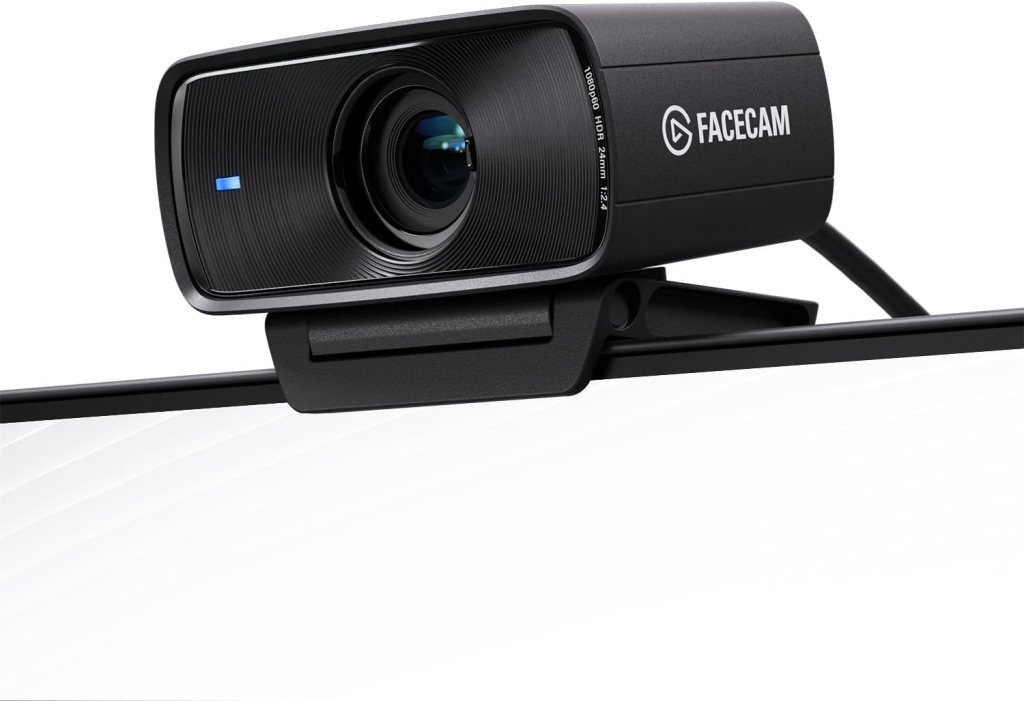
Elgato really understands creators, and it shows with the Facecam Mk.2. It’s tailored for streaming, with software that gives you manual control over image settings like ISO, shutter speed, and white balance.
It doesn’t have a built-in mic, which might seem like a con, but I actually see it as a non-issue, because if you’re serious about streaming or YouTube, you should be using a dedicated mic anyway.
What Makes It Stand Out:
- Clean image, especially at 1080p60
- Great control through Elgato’s Camera Hub
- No compression artifacts or weird auto settings
If you want something purpose-built for streaming, this one deserves a look.
5. Logitech C270 — Budget Done Right

Let’s say you’re just testing the waters and don’t want to drop a ton of money on gear yet. The Logitech C270 is a budget webcam that punches above its weight. It’s 720p, yes, but with decent lighting and some OBS tweaks, you can still get a perfectly acceptable image for Twitch or YouTube.
Best For:
- Absolute beginners
- Super tight budgets
- Secondary cam use (top-down shot, pet cam, etc.)
This isn’t the best webcam for streaming if you’re going full-time, but if you’re starting out or just want to dip your toes in, it’ll get the job done.
A Quick Word on DSLR Setups
Okay, so here’s my take on DSLR or mirrorless camera setups for streaming: unless your content heavily focuses on your face (like IRL streams or full-screen camera talking head videos), you probably don’t need one—especially not early on.
Your webcam is usually a small box in the corner of your stream. Dropping hundreds of dollars on a DSLR body, lens, camlink, and lighting setup just to increase quality in a tiny window usually isn’t the best use of money when you’re starting out.
If you’ve already maxed out the rest of your setup—your audio’s dialed in, your lighting is solid, your stream overlays look clean—then sure, go for it. DSLR will give you the best image quality, hands down. But I don’t think it’s the smartest place to start investing for most people.
USB webcams like the ones listed above are more than enough to carry you through even full-time streaming or content creation. And the gap in quality isn’t going to make or break your growth.
Final Thoughts: Pick the Webcam That Matches Your Goals
There’s no one-size-fits-all “best webcam for streaming” or “best webcam for YouTube.” It comes down to what you’re doing, what you care about, and where you are in your creator journey.
If you’re brand new and just want something solid, the C920 or C270 are still completely viable.
If you’re going full-time or want more control over your camera, the Razer Kiyo Pro, Brio, or Facecam Mk.2 are all fantastic choices.
What matters more than having the best gear is having the right gear—and knowing how to use it well. Focus on making good content, and let your gear grow with you.


 GoLiveGear
Leave a comment