

YouTube is one of the most powerful platforms for content creators, but standing out in an overcrowded space can be challenging. Many creators make great content yet struggle to gain views and subscribers because their videos aren’t properly optimized for search. This is where TubeBuddy comes in.
TubeBuddy is a free browser extension and mobile app (with premium plans available) that integrates directly into YouTube to enhance video SEO, streamline content management, and provide in-depth analytics. Whether you’re a new YouTuber or an experienced creator, TubeBuddy can help you optimize your videos and increase your chances of ranking higher in YouTube search results.
In this TubeBuddy review, we’ll break down its key features and how it can help grow your YouTube channel.
NOTE: Some links in this post are affiliate links, meaning we earn a commission at no extra cost to you. This helps support the site while we provide quality recommendations.
What Is TubeBuddy?
TubeBuddy is a YouTube-certified browser extension that adds a suite of powerful tools to your YouTube dashboard. It helps with SEO, competitor analysis, video management, and A/B testing, allowing you to optimize your content and improve your channel’s performance.
Once installed, TubeBuddy integrates seamlessly with your YouTube studio, making it easy to analyze video performance, find high-ranking keywords, and implement changes—all within YouTube’s interface.
Key Features of TubeBuddy
1. YouTube SEO Optimization
One of TubeBuddy’s biggest strengths is its SEO optimization tools, which help you rank higher in search results and get more organic traffic. Key features include:
- Keyword Explorer – Find the best keywords and tags to optimize your videos.
- SEO Studio – Step-by-step guidance to improve your video’s metadata.
- Tag Rankings – See where your videos rank for specific keywords in search results.
- Best Practices Audit – Get recommendations on how to improve your video’s SEO.
These tools take the guesswork out of optimizing your videos, helping you improve visibility and grow your audience.
2. Competitor Analysis
TubeBuddy allows you to analyze what’s working for other creators in your niche. When you visit any YouTube video, TubeBuddy provides insights into that video’s:
- Tags & Keywords – See what tags competitors are using.
- SEO Score – Understand how well their video is optimized.
- Performance Data – Compare your views, engagement, and growth metrics.
This helps you refine your own strategy and stay ahead of the competition.
3. Bulk Processing Tools
Managing a growing YouTube channel can be time-consuming, but TubeBuddy’s bulk editing tools make it easier by allowing you to:
- Update titles, descriptions, and tags across multiple videos at once.
- Apply end screens and cards in bulk.
- Automatically generate and translate captions for broader reach.
These tools save hours of manual work, letting you focus on creating new content instead.
4. A/B Testing for Thumbnails & Titles
TubeBuddy’s A/B testing tool lets you experiment with different thumbnails, titles, tags, and descriptions to see what performs best. YouTube’s algorithm favors higher engagement, so optimizing these elements can lead to better click-through rates and improved rankings.
5. Other Useful Features
TubeBuddy includes additional tools such as:
- Video Upload Templates – Save time by applying pre-set metadata to new videos.
- Canned Comment Responses – Quickly respond to frequently asked questions.
- Best Time to Publish – Identify when your audience is most active.
- Giveaway Comment Picker – Run contests and select winners fairly.
TubeBuddy Pricing
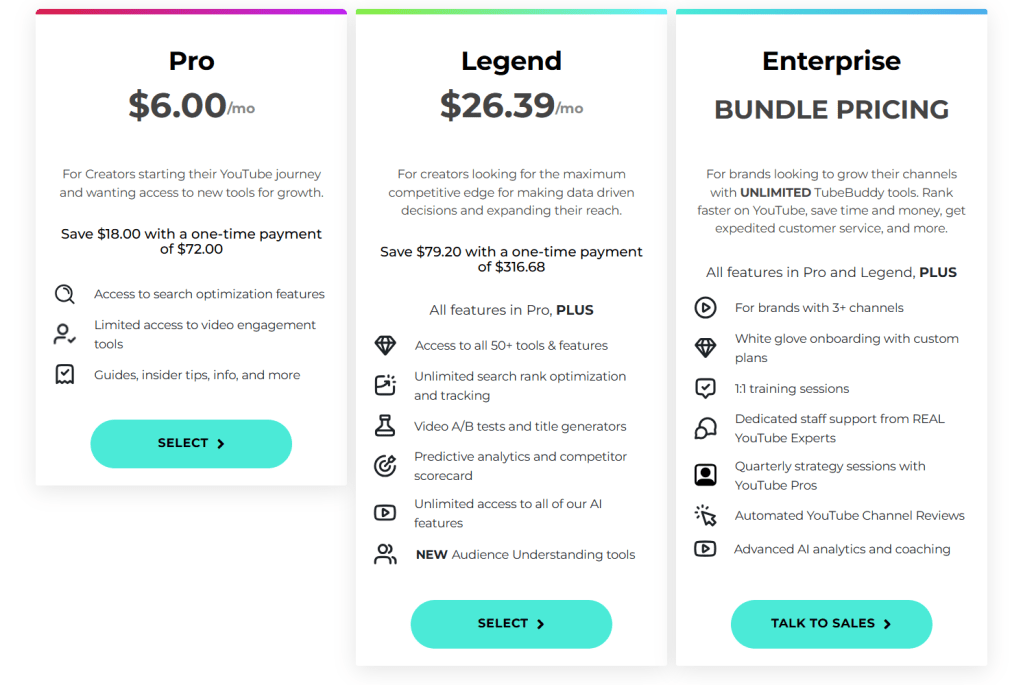
TubeBuddy offers a range of pricing plans tailored to different needs:
- Free Plan – Basic tools to get started with YouTube optimization.
- Pro Plan ($6.00/month) – Unlocks keyword research, SEO optimization, and limited bulk processing.
- Legend Plan ($26.39/month) – Includes Pro features plus access to additional tools, advanced analytics, A/B testing, and more robust automation features.
- Enterprise Plan (Varies) – Gives you all the features of the Pro and Legend tiers, plus access to dedicated staff and coaching that will help you grow your YouTube channel.
If you’re just starting out, the Pro Plan is a great entry point—especially since TubeBuddy offers a 50% discount if you have fewer than 1,000 subscribers, making it just $3.00 per month. You can get this TubeBuddy discount by using code ‘RisingStarBuddy‘ at checkout.
The Legend Plan is ideal for creators managing larger video libraries, while the Enterprise Plan is best for those who manage multiple channels and want to take them to new heights.
Is TubeBuddy Worth It?
If you’re serious about growing your YouTube channel, TubeBuddy is an essential tool. While the free version offers helpful features, upgrading to a paid plan unlocks powerful SEO and automation tools that can significantly boost your channel’s performance.
Personally, I think the lowest tier (Pro) is enough to get you going with TubeBuddy and is what I personally have. The greatest part is, if your channel is small and you’re just getting started, you can save 50% on TubeBuddy Pro, making it an absolute steal. Throughout my time using TubeBuddy, I have yet to feel the need to upgrade to the Legend package (let alone the Enterprise one).
The biggest thing that the Legend package offers over Pro—and what I could definitely see justifying the upgrade—is access to all of TubeBuddy‘s tools, giving you access to a stronger arsenal to manage your YouTube channel, which can be incredibly useful as your channel grows. I see the main need for the Enterprise plan to be for those managing multiple channels (or a very large channel) and who want personal assistance with running it. Besides that use case, I don’t see it being worth the investment.
But, considering that TubeBuddy Pro costs only $6.00 per month (or $3.00 if you have under 1,000 subscribers), it’s a small investment that can pay huge dividends in helping your channel grow.
Final Thoughts
With powerful SEO tools, automation features, and competitor insights, TubeBuddy is a must-have tool for YouTubers looking to maximize their growth. Whether you’re trying to improve your video rankings, optimize your metadata, or save time managing your channel, TubeBuddy makes it easier and more efficient.




 GoLiveGear
Leave a comment